Maze

A workshop for game masters, on your own server.

Read-aloud

Maze is a self-hosted web application where you prepare your tabletop RPG campaigns, alone or with co-GMs: characters, factions, places, maps and scenarios, written together in real time.

NPCs and factions live on a relationship graph, places in a tree with interactive maps, scenarios in a collaborative editor that links to all of them, and the events of your campaign on an optional timeline.

Self-hosted, free and open source (MIT). One Docker container, one SQLite database. Interface in English and French.

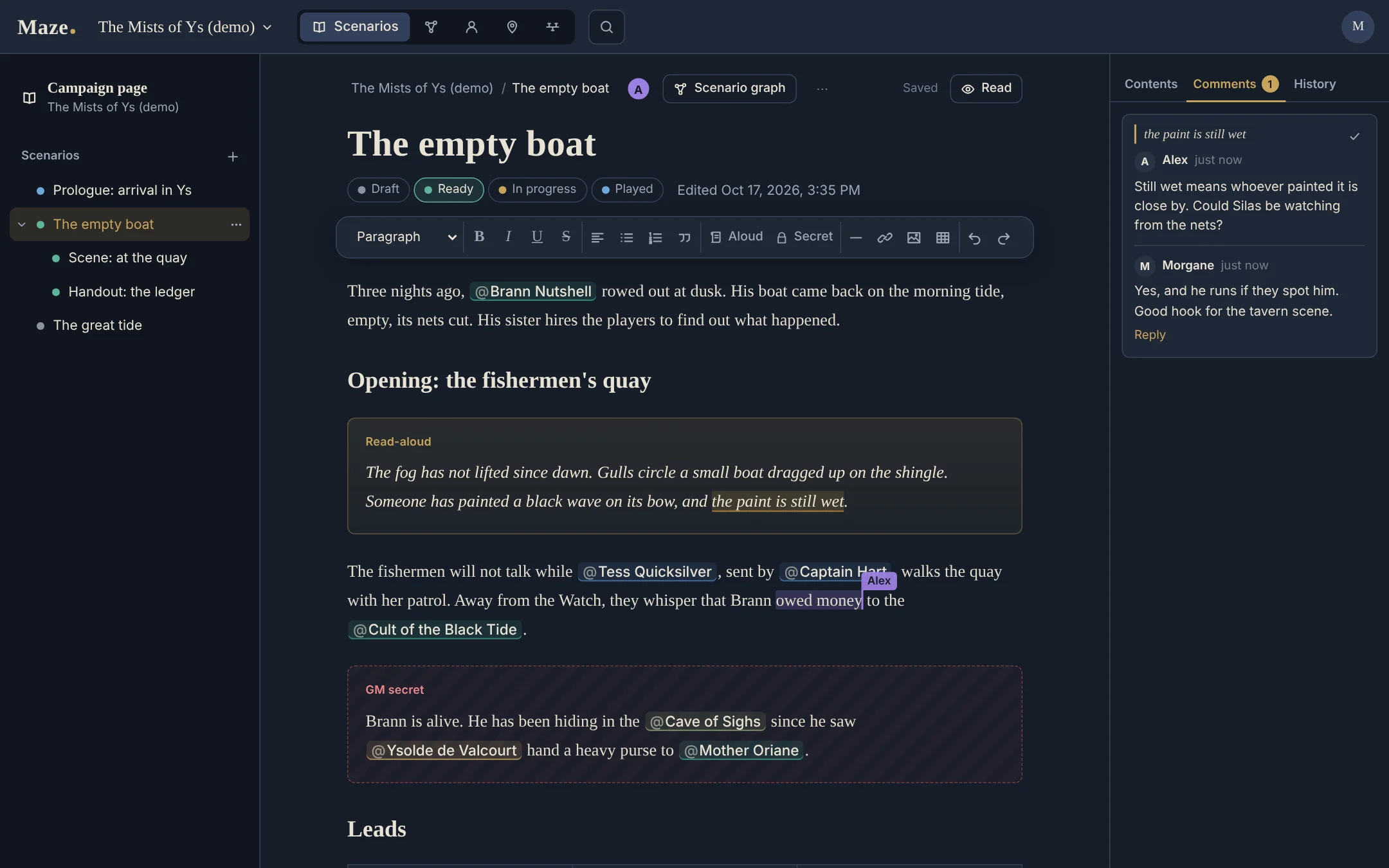
The scenario editor in Maze: a page titled The empty boat with a read-aloud box, a dashed GM secret box and mentions of NPCs. A co-GM named Alex has a phrase selected, and the side panel shows a comment thread between Alex and Morgane.
A scenario page of the demo campaign, open in two browsers: Alex's selection appears live in Morgane's editor, next to their comment thread.

Scenarios you write together

A campaign page, scenarios and nested sub-pages for acts, scenes and handouts, each with a status: draft, ready, in progress or played.

  • Read-aloud and GM secret boxes, tables, images, templates, a reading mode and clean printing.
  • @ mentions of NPCs, factions and places, which link the page to their sheets.
  • Real-time collaboration: several GMs edit the same page and see each other's cursors. Offline edits are merged on reconnection; what cannot be merged is kept in the page history.
  • Comment threads anchored to passages, and a version history with named versions and one-click restore.
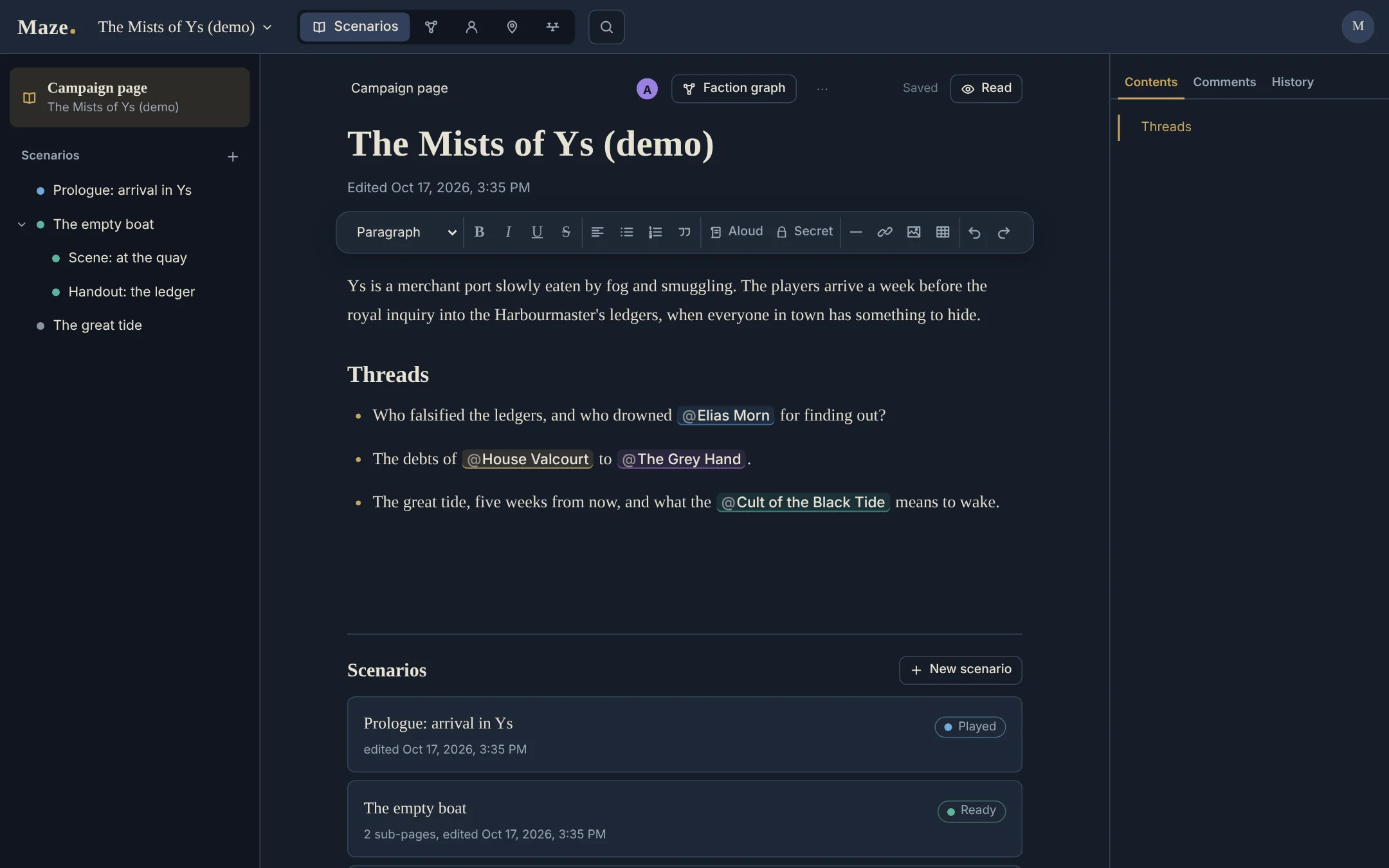
The campaign page of the demo, The Mists of Ys: an introduction with mentions of factions, and below it the list of scenarios with their status, Played and Ready. The sidebar shows the scenarios and their sub-pages.
The campaign page: introduction, threads, and the scenarios with their sub-pages.

NPCs, factions and places

Every character, faction and place has its own sheet, with what you need at the table and what the players must not see.

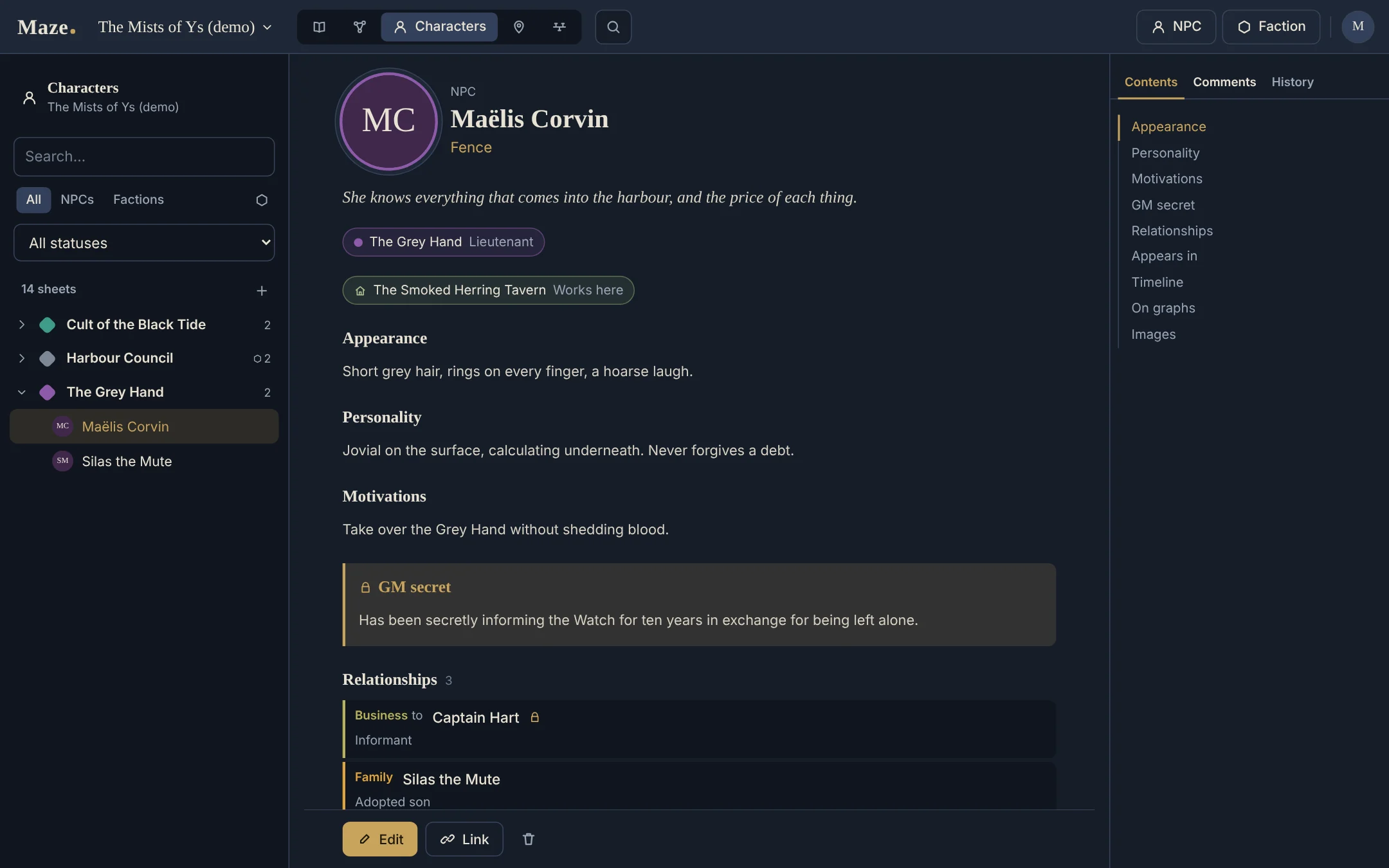
  • NPC sheets: portrait, status, hook, personality, motivations, GM secrets, gallery.
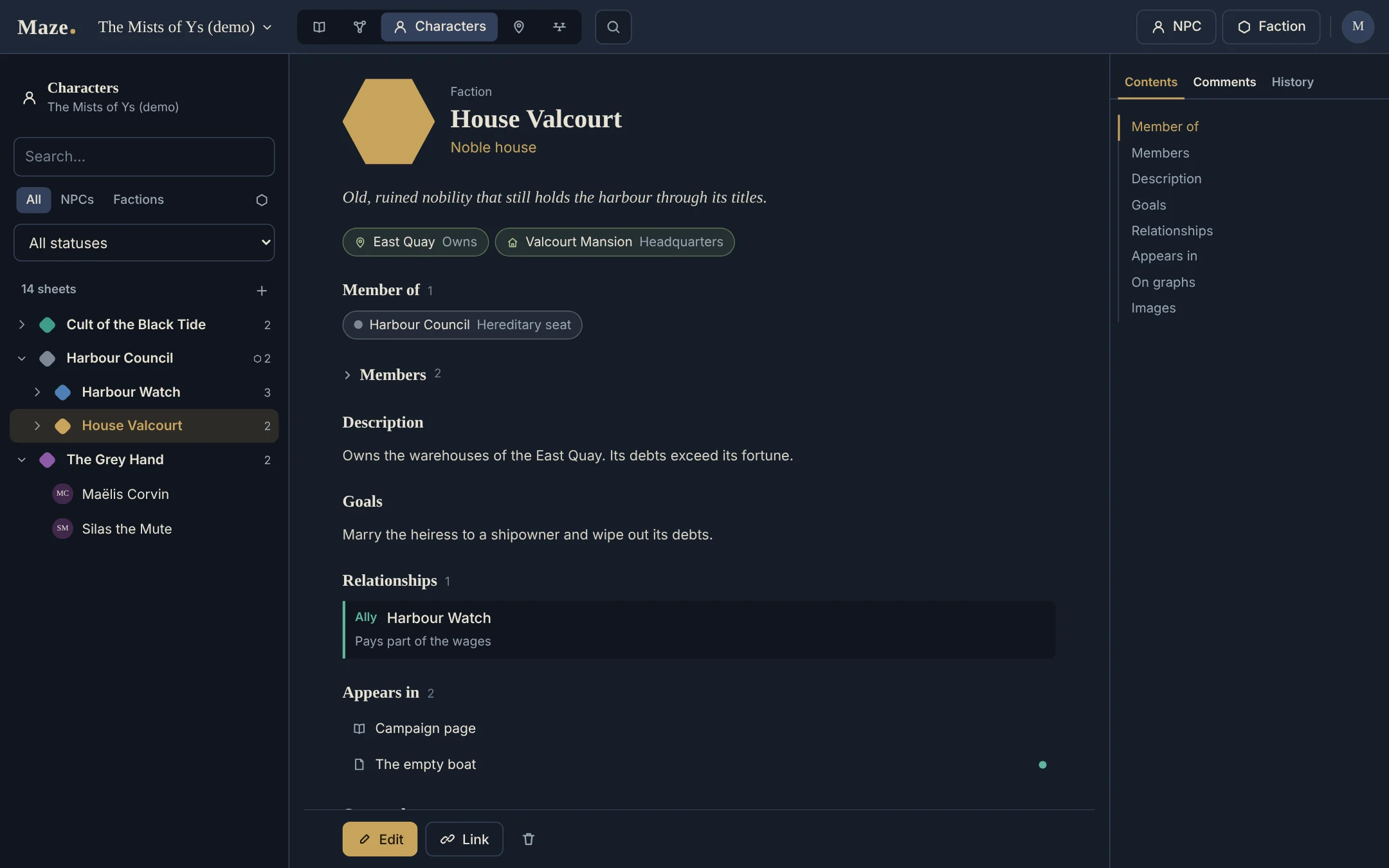
  • Faction sheets: colour, emblem, goals, resources, members and their role.
  • A faction tree in the Characters tab: sub-factions to any depth, a faction with several parents under each of them, drag and drop to reorder.
  • Places in a free hierarchy (region, city, building, room), with the NPCs and factions present.
  • Search across the whole campaign with Ctrl+K.
The sheet of the NPC Maëlis Corvin, a fence: her faction and role, the tavern where she works, appearance, personality, motivations, a GM secret box and her relationships. On the left, the Characters index arranged as a tree of factions.
An NPC sheet, with its GM secret.
The sheet of the faction House Valcourt, a noble house and a sub-faction of the Harbour Council: the places it owns, its members, description, goals, an ally relationship and the pages it appears in. On the left, the Characters index shows House Valcourt under the Harbour Council.
A faction sheet, under its parent faction in the Characters tree.

A relationship graph

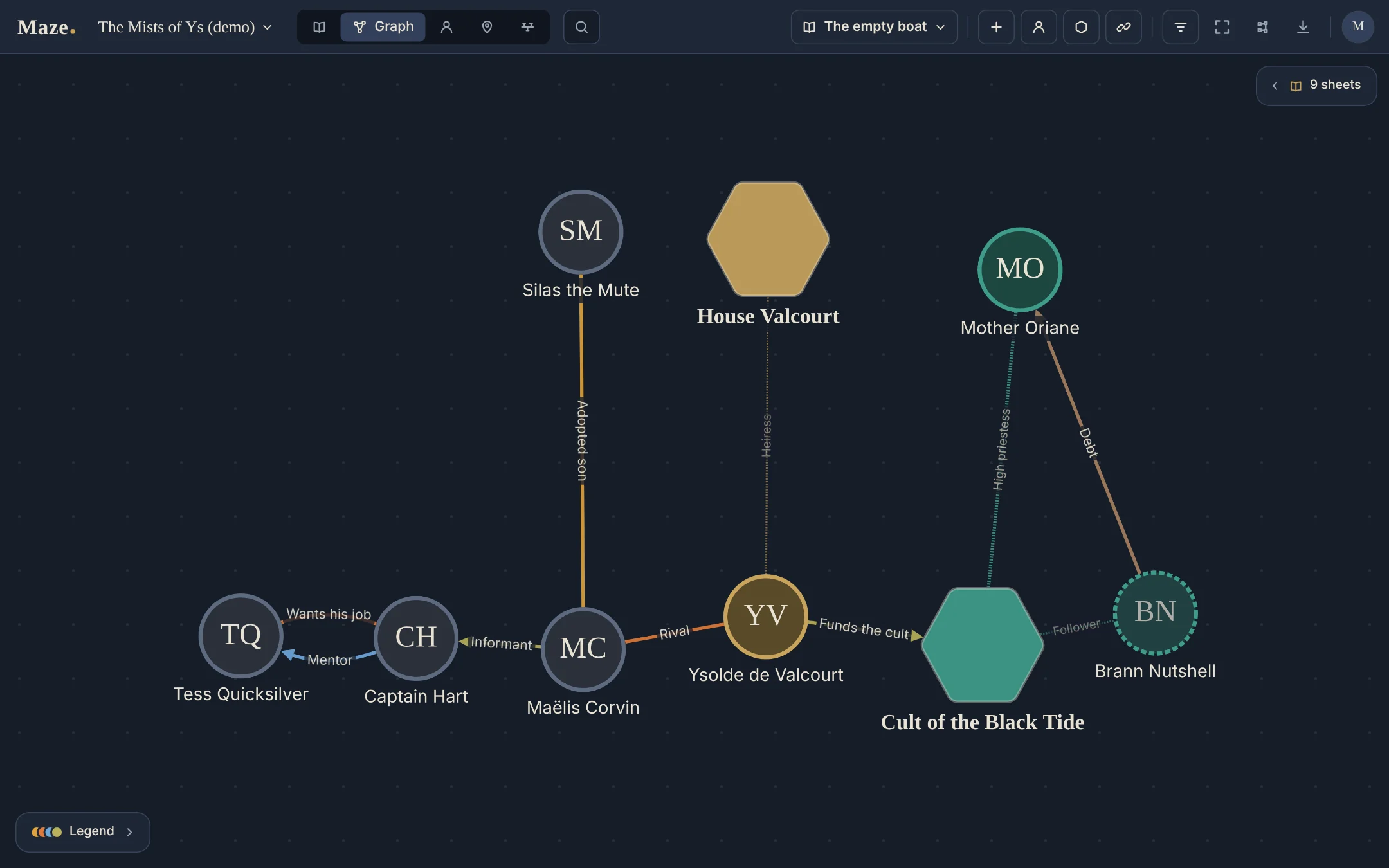
NPCs and factions on one board: who owes whom, who spies for whom, who wants whose job.

  • Typed relations (ally, enemy, family, rival, mentor, debt and your own), one-way or mutual, optionally secret.
  • Views for a scenario's cast, for the factions, or for a place.
  • Free placement, zoom, PNG export, and an automatic layout that keeps the most readable of several arrangements.
The relationship graph for the cast of the scenario The empty boat: round NPC nodes and hexagonal faction nodes linked by labelled lines such as Informant, Rival, Mentor, Debt and Funds the cult.
The cast of one scenario, drawn from the NPCs and factions its pages mention.

Interactive maps

Upload a map of up to 8192 pixels and pin your places on it.

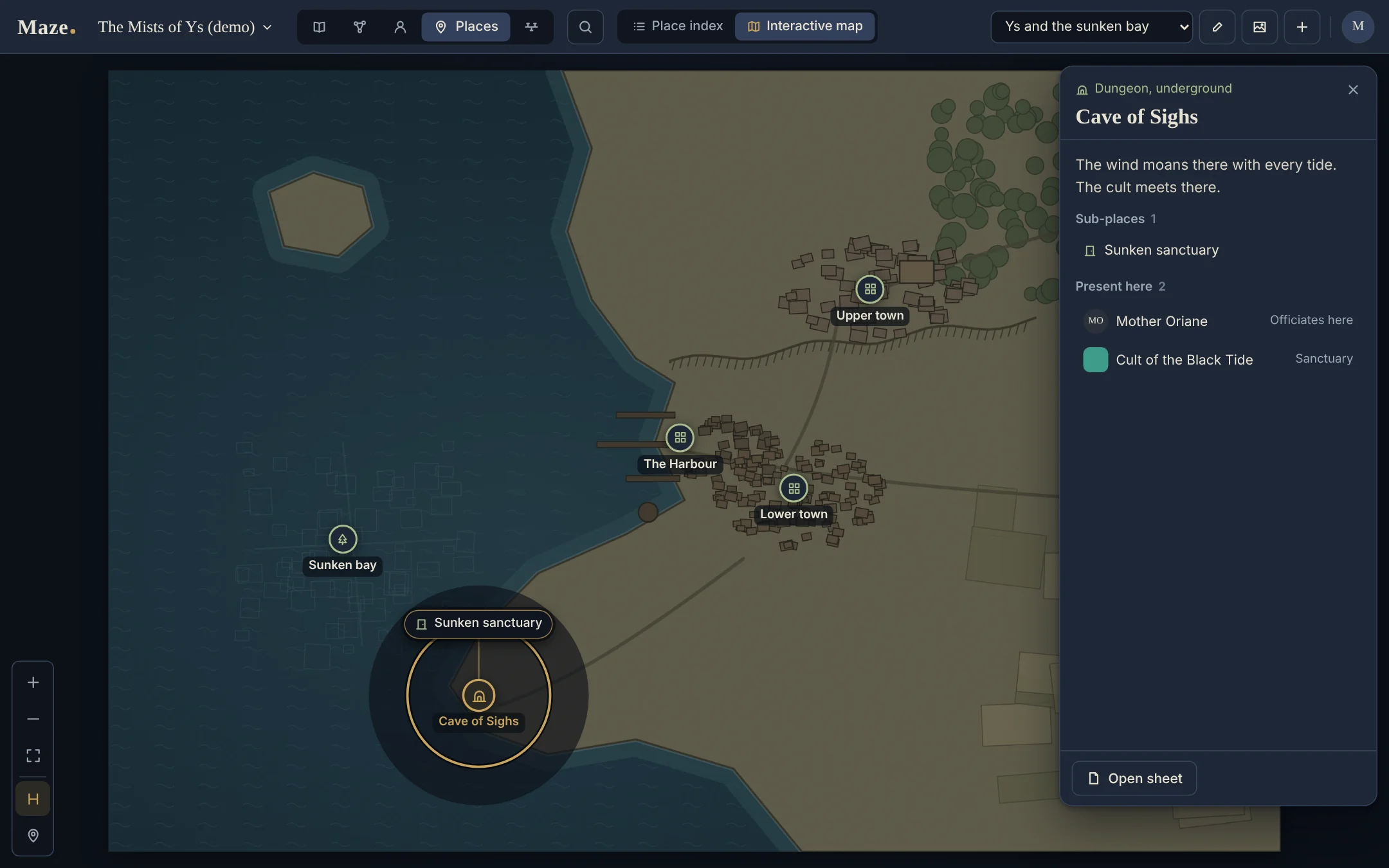
  • Rings of sub-places open around a pin, and a place with its own map can be entered.
  • The place's sheet opens beside the map, with who is there.
  • Custom icons per place type.
An interactive map of a harbour town on a drowned bay, with pins named The Harbour, Lower town, Upper town, Sunken bay and Cave of Sighs. The cave is open: its sub-place appears in a ring and its sheet is shown on the side.
A pinned place open on the map: its sub-places in a ring, its sheet on the side.

A timeline

An optional module, off by default and turned on campaign by campaign: the events of your campaign in the order you choose, with no calendar to set up.

  • Free dates ("742.M41", "Session 4"), a title, tags and a description with GM secret boxes and @ mentions.
  • Two views: a vertical list and a horizontal strip with a mini-map, each in a normal or compact layout.
  • Filter by tag, drag and drop in the list to reorder, search with Ctrl+K, export and import with the campaign.
  • Each NPC, faction and place sheet lists the events that mention it.
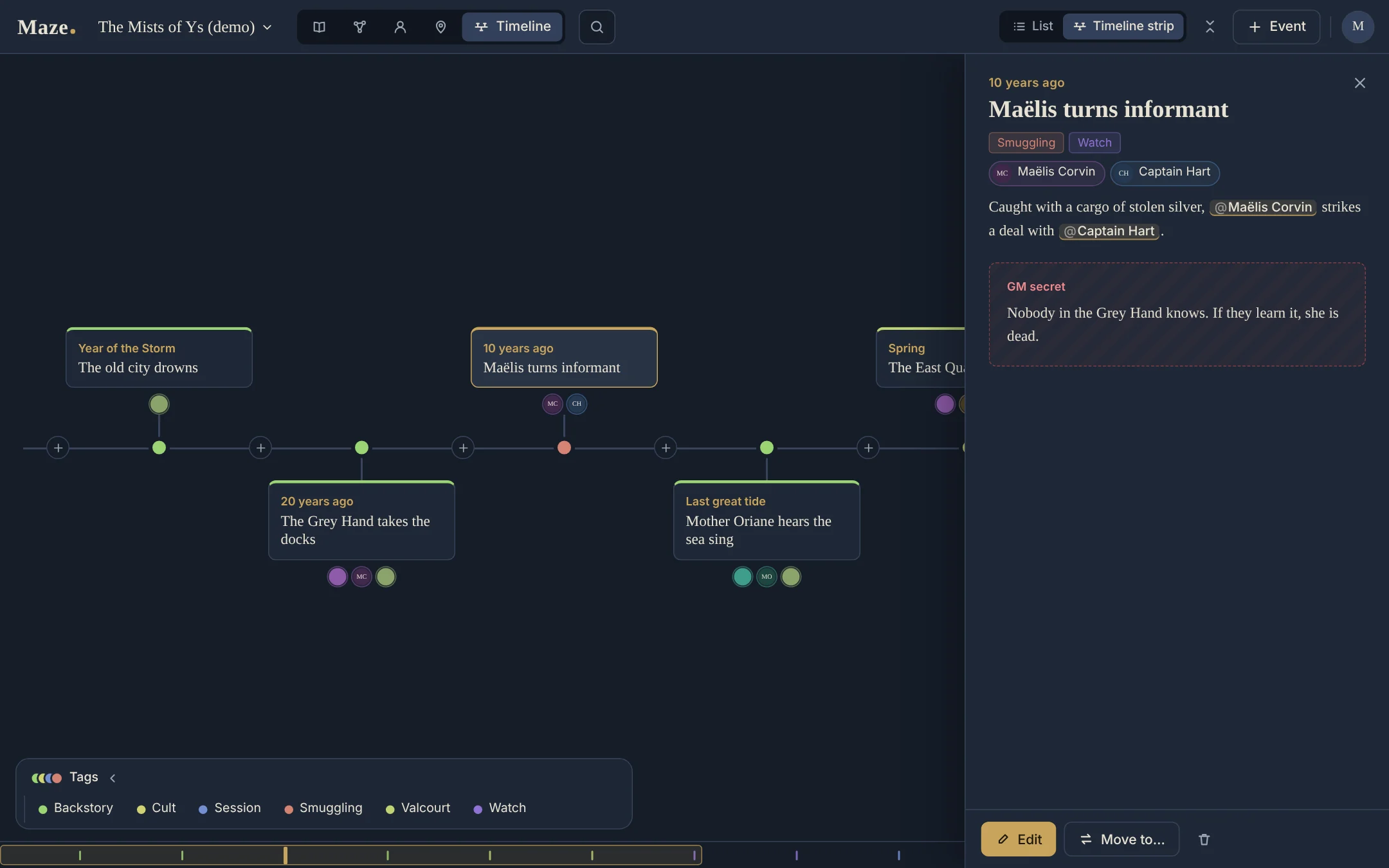
The timeline of the demo campaign as a horizontal strip: event cards alternate above and below an axis, each with its free date, such as Year of the Storm or 10 years ago, and the sheets it mentions. The event Maëlis turns informant is open on the side with its tags, its mentions and a GM secret box. The Tags panel and a mini-map run along the bottom.
The timeline strip: an event open on the side, the tags and the mini-map below.
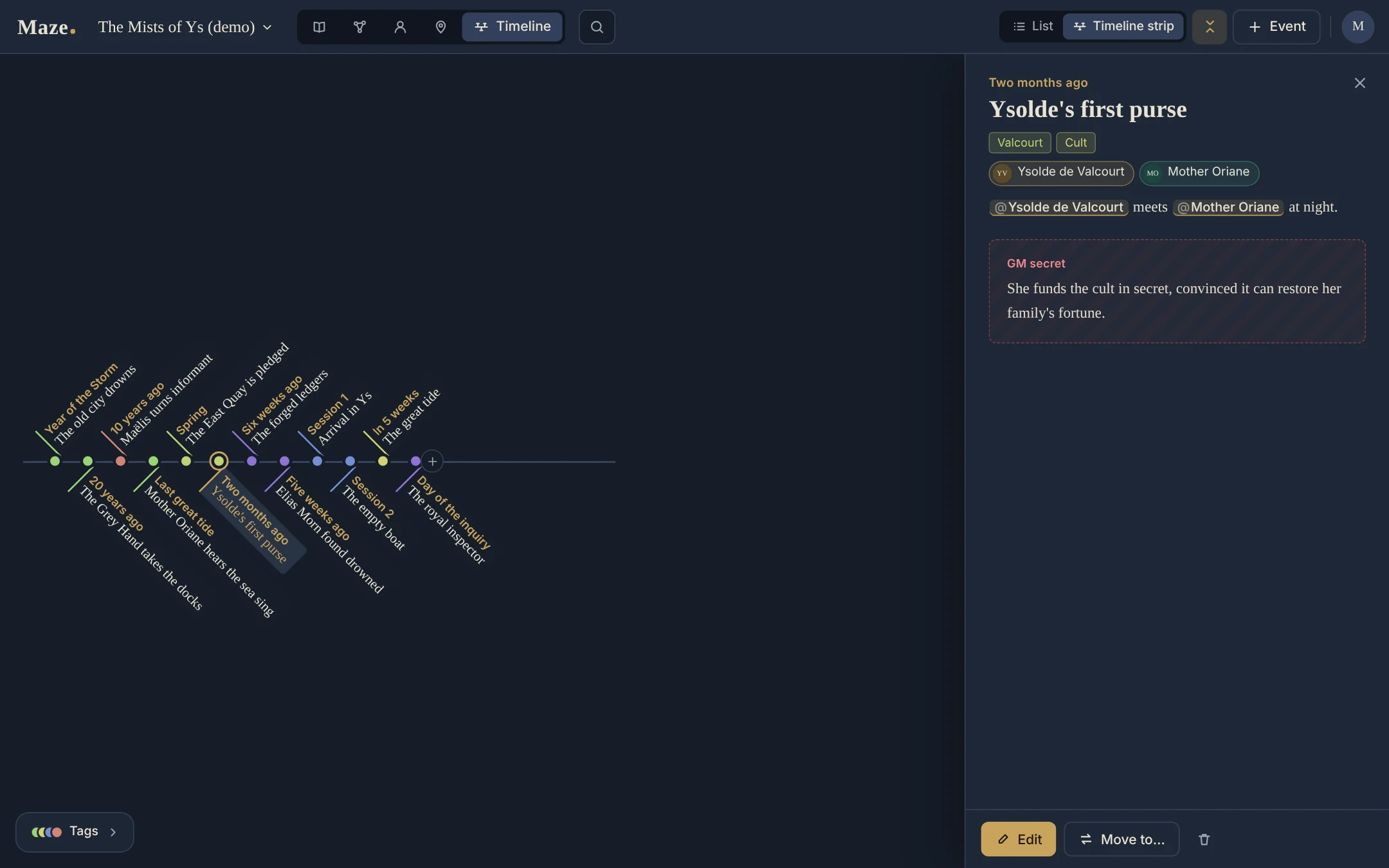
The compact timeline strip: twelve events staggered on both sides of the axis, their dates and titles written diagonally, from Year of the Storm to Day of the inquiry. The event Ysolde's first purse is open on the side.
The compact strip: the whole campaign at a glance.

Your server, your data

Maze runs as a single Docker container with a SQLite database. Everything stays on your machine.

  • Backups and restore from the web interface, plus a daily timer.
  • One-click updates from the administration, with automatic rollback if the new version is not healthy.
  • Two roles: administrator, and GM who sees only the campaigns assigned to them.
  • Campaign export and import as a .zip file.
  • Images in the administration: every image of a campaign (sheet galleries, page illustrations, map backgrounds, library), sorted by date, size or name, with multiple selection and bulk delete.
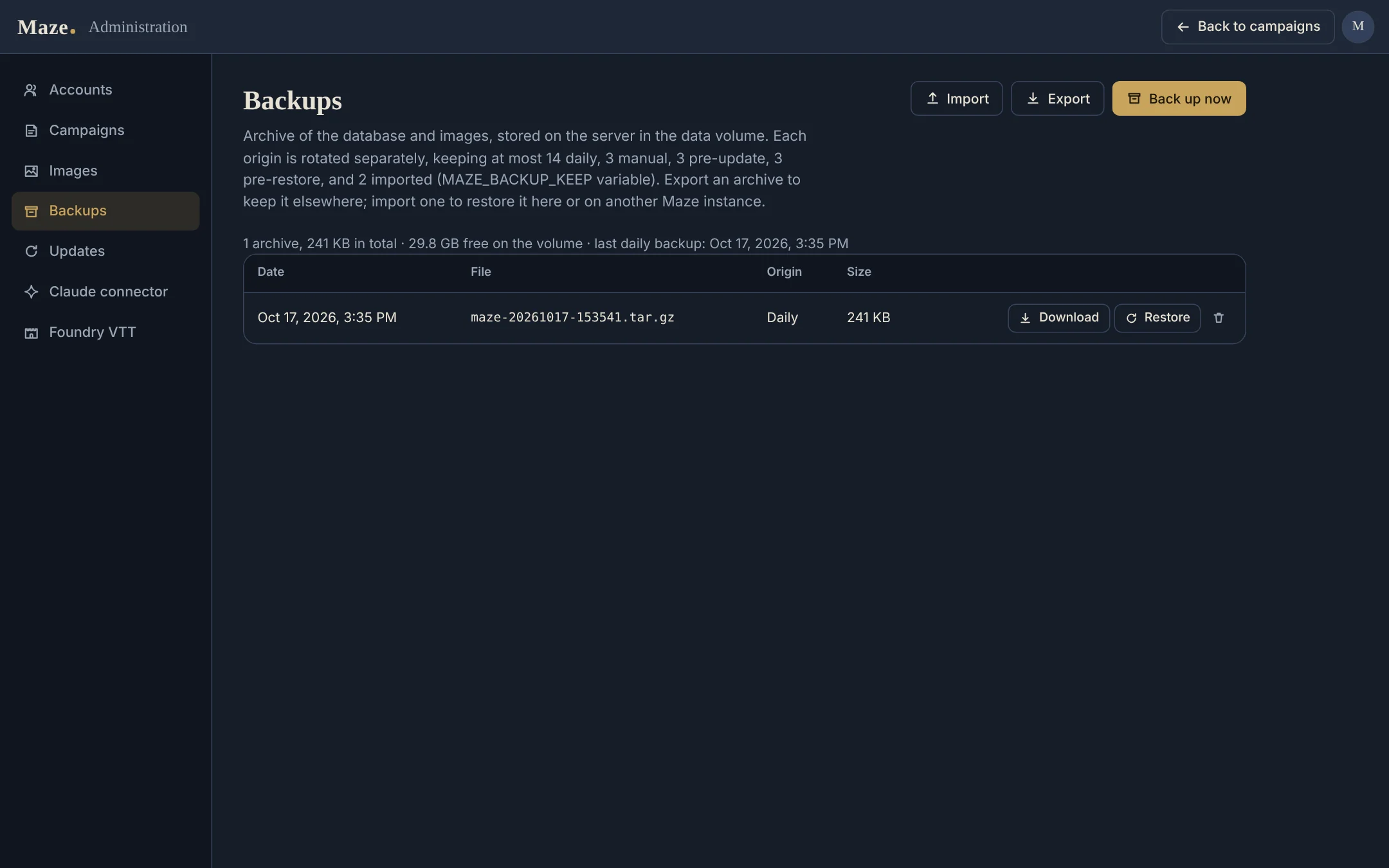
The Backups page of the administration: a list of archives with their date, file, origin and size, buttons to download or restore each one, and Import, Export and Back up now buttons.
Administration, Backups: download, restore, back up now.

Claude connector (MCP)

Maze includes a remote MCP server with its own OAuth 2.1 authorisation. Claude can search and read your campaigns and, if you allow it, edit sheets, relations and scenario pages, add timeline events, comment, add images and pin places on maps.

Each authorisation needs an administrator's password, actions are logged, and pages keep their version from before Claude's change.

Foundry VTT import

Your instance serves a module for Foundry 13 and 14. It imports a campaign, or what one scenario needs: a journal per NPC, faction and place, with secrets on a GM-only page, and a scene per interactive map with a note per pin.

The import is one-way and repeatable. Actors are filled in for the Dark Heresy systems only.

English and French

Every screen, every server message, the data created with a campaign and the Foundry module are available in both languages. Each GM chooses theirs in the account menu.

The detailed guide is in French. Other languages are welcome: the translation guide explains how.

Get started

Requirements: a Linux server with Docker and the Compose plugin, at least 10 GB of disk (the update script rebuilds the image next to the running one), a domain name, and a reverse proxy that terminates HTTPS. The examples use /opt/maze, maze.example.org and Caddy.

  1. Get the code

    sudo mkdir -p /opt/maze && sudo chown "$USER": /opt/maze
    git clone https://github.com/ranglier/Maze.git /opt/maze
    cd /opt/maze
    cp .env.example .env
    install -d -m 2775 control

    control/ receives the container's requests to the update service. The container runs as UID/GID 1000: if id -u is not 1000, also run sudo chgrp 1000 control.

  2. Administrator password (Docker secret)

    Masked input, run on its own (the length is shown to confirm):

    read -rs -p "Maze admin password: " MAZE_PW && echo " - entered (${#MAZE_PW} characters)"

    Then:

    mkdir -p secrets
    printf '%s' "$MAZE_PW" > secrets/maze_password.txt
    unset MAZE_PW
    chmod 600 secrets/maze_password.txt
    sudo chown 1000:1000 secrets/maze_password.txt

    It is used once, to create the admin account; secrets/ is ignored by git.

  3. Edit .env

    MAZE_BIND=127.0.0.1
    MAZE_PUBLIC_URL=https://maze.example.org
    FORWARDED_ALLOW_IPS=

    MAZE_BIND is 127.0.0.1 if the reverse proxy runs on the same machine, otherwise this machine's private IP; never 0.0.0.0 (Docker's published ports bypass firewalls such as ufw). For FORWARDED_ALLOW_IPS, see Configuration.

  4. Start

    docker compose up -d --build
    docker compose logs -f maze

    Optionally, load a demo campaign: docker compose exec maze python -m maze.demo (add --lang en for an English one; default: MAZE_DEFAULT_LOCALE).

Then point your reverse proxy to Maze and sign in as admin: the README has the Caddy configuration and first login, the daily backup timer and the update service. A step-by-step installation on a fresh Debian server, in French: deploy/installation-debian.md.